

MSSQL数据库防暴力破解最简单办法,快速封禁爆破IP
创始人
2025-12-01 15:35:49
0次
日常运维中,MSSQL数据库暴露在公网中,经常会遇到暴力破解的攻击,在1个小时内,可以登录尝试达千万次,严重消耗服务器资源,经过短暂的思考,决定使用MSSQL的ERRORLOG配合系统自带防火墙,自动阻断暴力破解的IP。
运行效果如下图: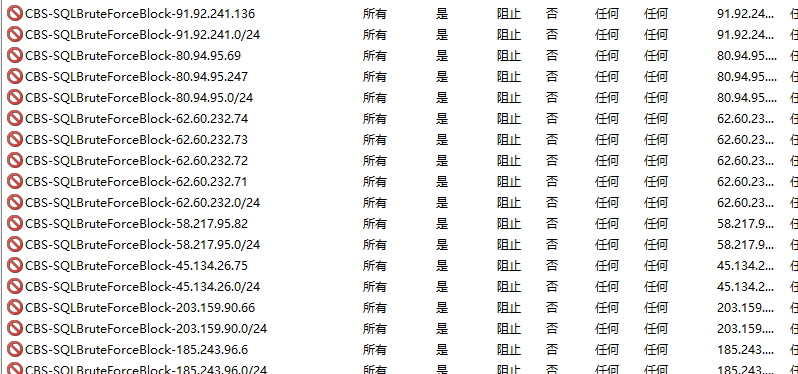
脚本代码:
# Block-SQLBruteForce-UTF16.ps1

param (
    [int]$HoursBack = 1, # ← 查询1个小时内的日志
    [int]$FailuresThreshold = 2, # ← 失败次数大于2次则封禁
    [string]$ErrorLogPath = "D:\sysSoft\mssql\MSSQL11.MSSQLSERVER\MSSQL\Log\ERRORLOG",
    #[string]$ErrorLogPath = "D:\ERRORLOG.2", # ← 如果调试,请自己指定ERRORLOG文件
    [string]$BlockLogPath = "C:\scripts\SQLBruteForceBlock.log",
    [switch]$WhatIf
)

function Write-BlockLog {
    param([string]$Message)
    $Timestamp = Get-Date -Format "yyyy-MM-dd HH:mm:ss"
    $LogEntry = "[$Timestamp] $Message"
    Add-Content -Path $BlockLogPath -Value $LogEntry -Encoding UTF8
    Write-Host $LogEntry
}


if ([string]::IsNullOrWhiteSpace($ErrorLogPath) -or !(Test-Path $ErrorLogPath)) {
    Write-Host "未找到 ERRORLOG,请指定 -ErrorLogPath" -ForegroundColor Red
    exit 1
}

Write-Host "使用日志文件: $ErrorLogPath" -ForegroundColor Cyan

# === 读取末尾 10MB(以 UTF-16 解码)===
$FileInfo = Get-Item $ErrorLogPath
$BufferSizeBytes = [Math]::Min(10MB, $FileInfo.Length)
$StartPos = [Math]::Max(0, $FileInfo.Length - $BufferSizeBytes)

# 注意:UTF-16 是双字节,确保读取偶数字节
if ($BufferSizeBytes % 2 -ne 0) { $BufferSizeBytes -= 1 }

$stream = New-Object System.IO.FileStream($ErrorLogPath, [System.IO.FileMode]::Open, [System.IO.FileAccess]::Read, [System.IO.FileShare]::ReadWrite)
$stream.Seek($StartPos, [System.IO.SeekOrigin]::Begin) | Out-Null

$buffer = New-Object byte[] $BufferSizeBytes
$bytesRead = $stream.Read($buffer, 0, $buffer.Length)
$stream.Close()

# 强制使用 UTF-16(Unicode)解码
try {
    $logTail = [System.Text.Encoding]::Unicode.GetString($buffer, 0, $bytesRead)
} catch {
    Write-Host "UTF-16 解码失败,尝试 ANSI..." -ForegroundColor Yellow
    $logTail = [System.Text.Encoding]::GetEncoding(936).GetString($buffer, 0, $bytesRead)
}

$Lines = $logTail -split "`r?`n"
if ($Lines.Count -gt 1) { $Lines = $Lines[1..($Lines.Count - 1)] } else { $Lines = @() }

# === 解析日志 ===
$CutoffTime = (Get-Date).AddHours(-$HoursBack)
$IPs = @()
$LastValidTime = $null

foreach ($line in $Lines) {
    if ([string]::IsNullOrWhiteSpace($line)) { continue }

    # 更新最近时间戳
    if ($line -match '^\s*(\d{4}-\d{2}-\d{2}\s+\d{2}:\d{2}:\d{2}(?:\.\d{1,3})?)') {
        try {
            $timeStr = $matches[1]
            if ($timeStr -match '\.(\d{1,3})') {
                $ms = $matches[1].PadRight(3, '0').Substring(0, 3)
                $timeStr = $timeStr -replace '\.\d+$', ".$ms"
            }
            $LastValidTime = [DateTime]::ParseExact($timeStr, "yyyy-MM-dd HH:mm:ss.fff", $null)
        } catch {
            try {
                $LastValidTime = [DateTime]::ParseExact($timeStr.Substring(0, 19), "yyyy-MM-dd HH:mm:ss", $null)
            } catch {
                $LastValidTime = $null
            }
        }
    }

    # 检查是否包含外部客户端 IP
    if ($LastValidTime -and $LastValidTime -ge $CutoffTime) {
        if ($line -match '\[客户端:\s*([^\]]+)\]') { # ←这个正在很关键,请根据自己的日志文件实际内容进行修改
            $rawIP = ($matches[1]).Trim()
            Write-Host $rawIP
            if ($rawIP -in @('<local machine>', '127.0.0.1', '::1', '0.0.0.0', '<named pipe>', '<shared memory>', '')) {
                continue
            }
            # 只接受 IPv4 或 IPv6 地址
            if ($rawIP -match '^(\d{1,3}\.){3}\d{1,3}$' -or $rawIP -match '^([0-9a-fA-F:]+)$') {
                # 额外验证 IPv4 合法性
                if ($rawIP -match '^(\d{1,3}\.){3}\d{1,3}$') {
                    $isValidIPv4 = $true
                    foreach ($octet in $rawIP.Split('.')) {
                        if ([int]$octet -lt 0 -or [int]$octet -gt 255) {
                            $isValidIPv4 = $false; break
                        }
                    }
                    if (-not $isValidIPv4) { continue }
                }
                $IPs += $rawIP
            }
        }
    }
}

Write-Host "扫描 $($Lines.Count) 行,发现 $($IPs.Count) 条外部失败记录。" -ForegroundColor Cyan

if ($IPs.Count -eq 0) {
    Write-Host "无有效攻击 IP。" -ForegroundColor Gray
    exit 0
}

# === 提取子网(仅处理 IPv4)===
$Subnets = @()
foreach ($ip in $IPs) {
    if ($ip -match '^(\d{1,3}\.){3}\d{1,3}$') {
        # 构造 /24 子网(如 115.115.115.5 → 115.115.115.0/24)
        $octets = $ip.Split('.')
        $subnet = "$($octets[0]).$($octets[1]).$($octets[2]).0/24"
        $Subnets += $subnet
    }
}

# === 统计:单个 IP 和子网 ===
$IPGroups = $IPs | Group-Object | Where-Object { $_.Count -ge $FailuresThreshold }
$SubnetGroups = $Subnets | Group-Object | Where-Object { $_.Count -ge $FailuresThreshold }

# === 获取现有防火墙规则(增强版)===
$RulePrefix = "CBS-SQLBruteForceBlock-"
$ExistingRules = @{}

try {
    $rules = Get-NetFirewallRule -DisplayName "$RulePrefix*" -ErrorAction SilentlyContinue
    foreach ($rule in $rules) {
        $displayName = $rule.DisplayName
        if ($displayName -like "$RulePrefix*") {
            # 提取规则名部分(去掉前缀)
            $key = $displayName.Substring($RulePrefix.Length)
            $ExistingRules[$key] = $true
        }
    }
} catch {
    Write-Host "获取防火墙规则失败:$_" -ForegroundColor Yellow
}

# === 清理旧规则===
$CleanupThreshold = (Get-Date).AddHours(-2)
$OldRules = Get-NetFirewallRule -DisplayName "$RulePrefix*" -ErrorAction SilentlyContinue
foreach ($rule in $OldRules) {
    $desc = $rule.Description
    if ($desc -match 'Auto-blocked at (\d{4}-\d{2}-\d{2}T\d{2}:\d{2}:\d{2})') {
        try {
            $createTime = [DateTime]::ParseExact($matches[1], "yyyy-MM-ddTHH:mm:ss", $null)
            if ($createTime -lt $CleanupThreshold) {
                if ($WhatIf) {
                    Write-Host "[WhatIf] 删除过期规则: $($rule.DisplayName) (创建于 $createTime)" -ForegroundColor Magenta
                } else {
                    Remove-NetFirewallRule -DisplayName $rule.DisplayName -ErrorAction Stop
                    Write-Host "删除过期规则: $($rule.DisplayName)" -ForegroundColor Gray
                }
            }
        } catch {
            continue
        }
    }
}

# === 封禁单个 IP===
if ($IPGroups) {
    Write-Host "待封禁的单个 IP:" -ForegroundColor Yellow
    foreach ($g in $IPGroups) {
        $ip = $g.Name
        if ($ExistingRules.ContainsKey($ip)) {
            Write-Host "$ip 已封禁" -ForegroundColor Gray
            continue
        }

        if ($WhatIf) {
            Write-Host "[WhatIf] 封禁单个 IP: $ip ($($g.Count) 次)" -ForegroundColor Magenta
        } else {
            try {
                $timestamp = (Get-Date).ToString("yyyy-MM-ddTHH:mm:ss")
                New-NetFirewallRule -DisplayName "${RulePrefix}${ip}" `
                                    -Direction Inbound `
                                    -RemoteAddress $ip `
                                    -Action Block `
                                    -Profile Any `
                                    -Description "Auto-blocked at $timestamp for $($g.Count) SQL login failures" `
                                    -ErrorAction Stop | Out-Null
                Write-Host "封禁成功: $ip" -ForegroundColor Green
                Write-BlockLog "BLOCKED (IP): $ip ($($g.Count) failures)"
            } catch {
                Write-Host "封禁失败(需管理员权限): $_" -ForegroundColor Red
            }
        }
    }
}

# === 新增:封禁可疑子网 ===
if ($SubnetGroups) {
    Write-Host "待封禁的可疑子网(/24):" -ForegroundColor DarkYellow
    foreach ($g in $SubnetGroups) {
        $subnet = $g.Name  # e.g., "115.115.115.0/24"
        if ($ExistingRules.ContainsKey($subnet)) {
            Write-Host "子网 $subnet 已封禁" -ForegroundColor Gray
            continue
        }

        # 避免封禁内网或特殊网段(可选增强)
        $network = ($subnet -split '/')[0]
        if ($network -match '^(10\.|192\.168\.|172\.(1[6-9]|2[0-9]|3[01])\.)') {
            Write-Host "跳过内网子网: $subnet" -ForegroundColor Yellow
            continue
        }

        if ($WhatIf) {
            Write-Host "[WhatIf] 封禁子网: $subnet ($($g.Count) 次关联失败)" -ForegroundColor Magenta
        } else {
            try {
                $timestamp = (Get-Date).ToString("yyyy-MM-ddTHH:mm:ss")
                New-NetFirewallRule -DisplayName "${RulePrefix}${subnet}" `
                                    -Direction Inbound `
                                    -RemoteAddress $subnet `
                                    -Action Block `
                                    -Profile Any `
                                    -Description "Auto-blocked subnet at $timestamp for $($g.Count) SQL login failures from this /24" `
                                    -ErrorAction Stop | Out-Null
                Write-Host "封禁成功: $subnet" -ForegroundColor Green
                Write-BlockLog "BLOCKED (SUBNET): $subnet ($($g.Count) failures)"
            } catch {
                Write-Host "封禁子网失败(需管理员权限): $_" -ForegroundColor Red
            }
        }
    }
}

if (-not $IPGroups -and -not $SubnetGroups) {
    Write-Host "无 IP 或子网达到阈值(≥$FailuresThreshold 次)" -ForegroundColor Gray
}

Write-Host "完成。" -ForegroundColor Cyan
以上脚本保存为 XXXX.ps1 文件。
调试方式:
1、管理方式运行 PowerShell
2、显示调用:PowerShell.exe -ExecuteionPolicy Bypass -File C:\XXXX.ps1 -HoursBack 1 -FailuresThreshold 2 -WhatIf
命令行参数:
HoursBack 检查日志的时间范围
FailuresThreshold 封禁阈值
WhatIf 调试模式
上一篇:没有了
下一篇:没有了
相关内容
热门资讯
MSSQL数据库防暴力破解最简...
日常运维中,MSSQL数据库暴露在公网中,经常会遇到暴力破解的攻击,在1个小时内,可以登录尝试达千万...